
Why DIY Computer Repairs Often Cost More Than Professional Fixes
- gotobowl82
- Jan 12
- 4 min read

DIY Computer Repairs
When a laptop slows down, overheats, or suddenly stops working, many people head straight to YouTube. Online tutorials make computer repair look easy: remove a few screws, swap a part, apply some paste, and power it back on. Unfortunately, reality rarely follows the video.
At 208Geek, we see the aftermath of well-intentioned DIY computer repairs every week. Customers don’t come in because they enjoy spending extra money. They come in because a small issue turned into a much larger problem after an attempted fix at home. In many cases, the original repair would have cost far less if handled professionally from the start.
DIY repairs don’t just risk hardware. They often lead to lost time, lost data, and avoidable replacement costs.
Modern Laptops Are Not Built for DIY Computer Repairs
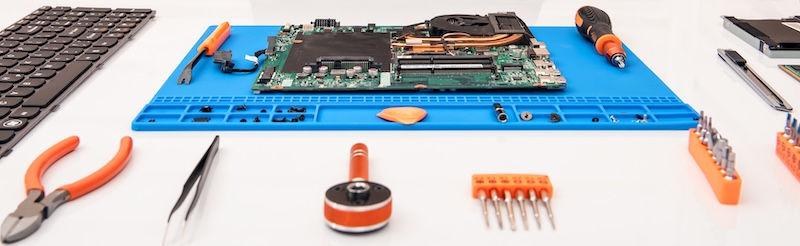
Today’s laptops pack an incredible amount of hardware into extremely tight spaces. Manufacturers prioritize thin designs, compact layouts, and integrated components. That design makes laptops faster and lighter—but far more fragile during disassembly.
Even something as simple as opening the bottom panel can cause damage if done incorrectly. Clips snap. Screws strip. Plastic flexes in ways it shouldn’t. Once that happens, reassembly becomes unreliable, even if the original issue gets addressed.
Professional technicians work with these designs every day. We know where resistance means “stop” instead of “pull harder.”
Ribbon Cable Damage Happens Fast

One of the most common DIY mistakes involves ribbon cables. These thin, flexible connectors link keyboards, touchpads, displays, batteries, and daughterboards to the motherboard. They look harmless, but they tear, crease, and shear with almost no force.

DIY repairs often fail because someone:
· Pulls a ribbon cable straight up instead of unlocking the connector
· Bends a cable at a sharp angle during reassembly
· Reinstalls a cable slightly misaligned
· Forgets to reseat a connector entirely
A single damaged ribbon cable can disable a keyboard, kill a display, or prevent a system from powering on. In many cases, the cable isn’t sold separately, forcing replacement of an entire assembly. What started as a $150 repair quickly becomes a $400–$700 problem.
Thermal Paste Errors Create Long-Term Damage

Another frequent DIY issue involves thermal paste. Online guides often oversimplify this step, making it seem foolproof. It isn’t.
Thermal paste regulates heat transfer between the CPU or GPU and the cooling system. Too little paste creates air gaps that trap heat. Too much paste spills over onto surrounding components. Incorrect application patterns lead to uneven cooling and throttling.
We regularly see systems damaged because someone:
Used household paste not designed for electronics
Applied far too much paste
Failed to clean old compound properly
Reinstalled a heatsink unevenly
Improper thermal management doesn’t always cause immediate failure. Instead, it slowly degrades performance, shortens component lifespan, and leads to overheating months later—long after the DIY repair feels “successful.”

Static Discharge: The Invisible Laptop Killer
Static electricity doesn’t need sparks to cause damage. A small discharge that you never feel can destroy sensitive components on a motherboard.
DIY repairs often happen on kitchen tables, couches, or carpets—exactly the environments that generate static. Touching a board without proper grounding can damage chips instantly or weaken them enough to fail later.
Professional repair environments minimize static risks through grounded workspaces, proper handling procedures, and experience. That protection matters far more than most people realize.
Parts Swapping Without Diagnosis Wastes Money

Another major DIY pitfall involves guessing. When a laptop won’t power on or runs slowly, people often assume the problem comes from the most obvious part. They replace batteries, drives, fans, or memory without confirming the root cause.
We regularly see customers who replaced multiple parts only to discover:
The motherboard had power regulation failure
The issue stemmed from corrupted firmware
A failing charger damaged the charging circuit
Liquid exposure caused hidden corrosion
Without proper diagnostics, part swapping turns into expensive trial and error. Professional diagnostics pinpoint the actual failure before any replacement happens.

Data Loss Often Becomes the Most Expensive Consequence
DIY repairs don’t just damage hardware. They frequently put data at risk.
Removing storage devices incorrectly, forcing power cycles, or reinstalling operating systems without backups leads to lost documents, photos, and business files. Data recovery costs far more than most hardware repairs—and in some cases, data becomes unrecoverable.
At 208Geek, data preservation plays a key role in our diagnostic process. Protecting information matters just as much as fixing the machine itself.
Time Has a Cost Too

DIY repairs consume time. Researching tutorials, ordering parts, attempting fixes, and troubleshooting mistakes can take hours—or days. When the repair fails, customers still need professional help.
For business owners and remote workers, downtime costs more than the repair itself. Professional service often restores systems faster, with fewer disruptions and far less frustration.
Why Professional Repairs Save Money in the Long Run
Professional repair doesn’t just fix symptoms. It prevents secondary damage, protects data, and ensures correct reassembly. Technicians use the right tools, the right materials, and proven procedures built through experience.
At 208Geek, we don’t guess. We test. We document. We explain what failed, why it failed, and what options make the most sense moving forward. That transparency helps customers avoid repeat failures and unnecessary expenses. To read more about our thorough process, read last week’s blog post.
DIY repairs promise savings. Too often, they deliver the opposite.
When to Call a Professional Instead

If your laptop shows signs of overheating, random shutdowns, charging issues, liquid exposure, or performance drops, professional diagnostics provide clarity before damage escalates. Opening a device without training turns minor issues into major repairs more often than people expect.
Sometimes the smartest repair decision involves knowing when not to open the laptop yourself.
About 208Geek in Meridian, Idaho
Owner/Operator Jacob Van Vliet began building and repairing computer systems for friends and family out of his home in 2001. The increasing demand for computer repair led to the opening of 208Geek in the Fall of 2005, with the vision of providing outstanding service and peace of mind. Jacob, along with his team, including his wife, Brittany, is committed to delivering unparalleled, friendly, and professional service with a 100% satisfaction guarantee. The 208Geek team has been named ‘Idaho’s Best’ for IT and computer repair for the past six consecutive years. We would love the opportunity to work with you so we can show you why!


Comments